If you are not receiving test campaign messages on your phone, please review the following checks and possible reasons.
1. Verify the Phone Number Format
Ensure that the phone number is added with the correct country code.
Example format:91XXXXXXXXXX (for India)
If the country code is missing or incorrect, the message may fail to deliver.
2. Meta Frequency Capping Restrictions
Another possible reason for not receiving test messages is Meta’s Frequency Capping policy.
Frequency capping is implemented by Meta to improve the user experience on WhatsApp by limiting the number of marketing messages a user can receive within a specific timeframe.
This mechanism helps businesses by:
Improving overall message delivery quality
Ensuring communications have a higher impact
Reducing the chances of users feeling overwhelmed by marketing messages
Increasing engagement rates
Please note that this limitation is controlled by Meta and not by the KwikEngage platform.
You can read more about Meta’s error codes and restrictions here:
https://developers.facebook.com/docs/whatsapp/cloud-api/support/error-codes/#error-codes
3. Verify the Message Status from Logs
Even if the message is not received on the phone, you can verify whether it was triggered successfully from the Logs section.
Steps to check message status:
Visit the Logs page:
https://app.kwikengage.ai/logsEnter your phone number in the search bar.
Check the delivery status of the message to see whether it was:
Sent
Delivered
Failed (with error reason)
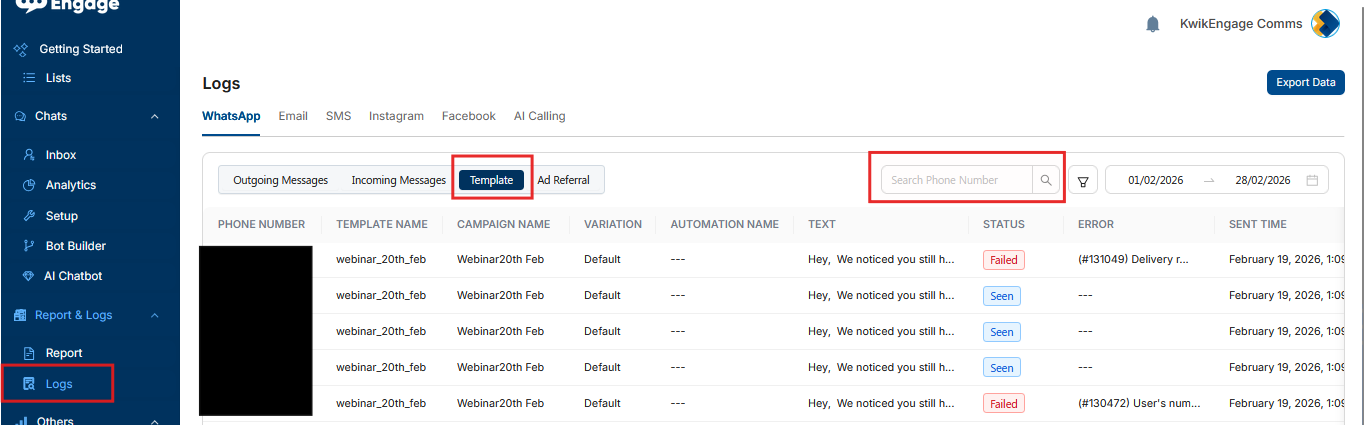
Alternatively, you can try adding a different phone number for testing and verifying the message status in the Logs section.
Was this article helpful?
That’s Great!
Thank you for your feedback
Sorry! We couldn't be helpful
Thank you for your feedback
Feedback sent
We appreciate your effort and will try to fix the article