Yes, you can manually add a contact from the Chat section (Inbox) by clicking on the add contact icon and filling in the required details (as shown in the screenshot).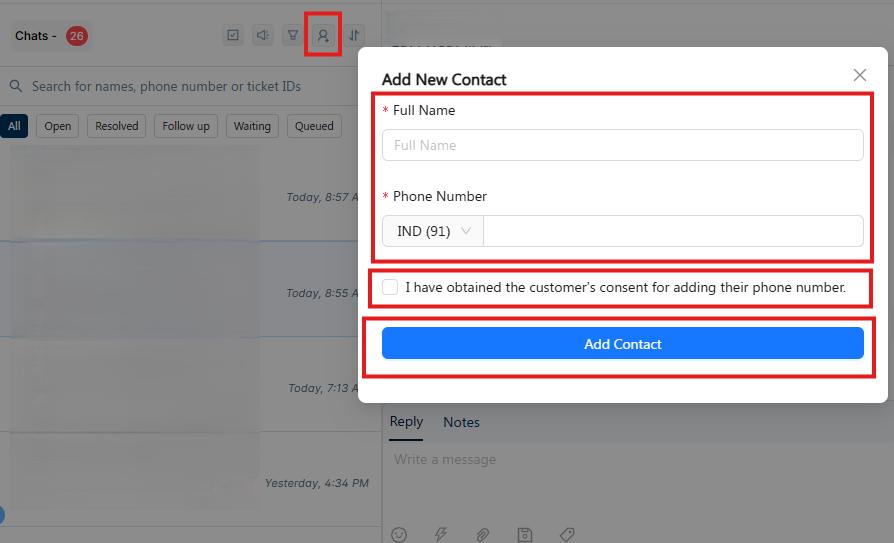
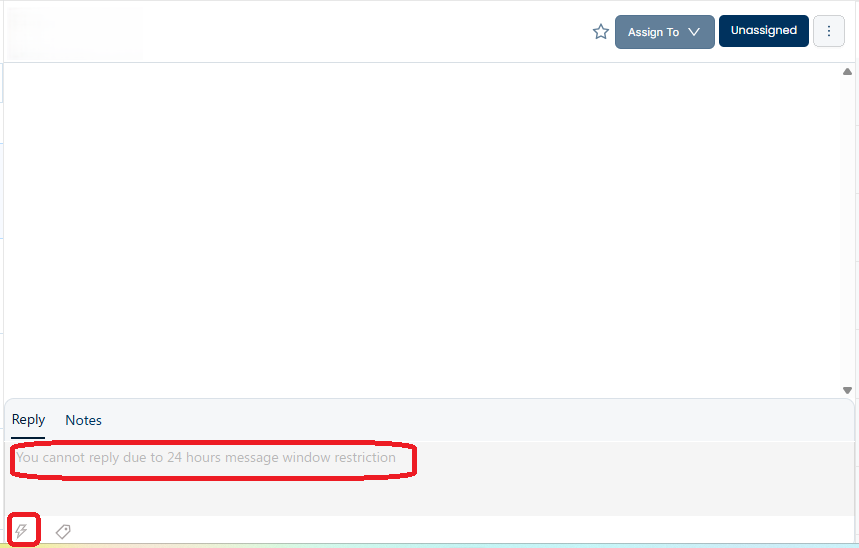
You can send an initial message by clicking on the thunder icon at the bottom and selecting a pre-approved utility template (as shown in the screenshot).
Please note:
Only one utility template message can be sent initially.
The conversation will become two-way only after the customer responds to this message.
Alternatively, you can reach out to customers using campaigns, which is the recommended approach for bulk or proactive communication. You can target customers by:
Creating segments based on Shopify data, or
Uploading a manual contact list
Helpful guides:
How to create a segment based on Shopify data:
https://docs.kwikengage.ai/support/solutions/articles/82000914331-how-to-create-segment-basis-shopify-data-to-run-a-campaign-How to run a broadcast message or campaign:
https://docs.kwikengage.ai/support/solutions/articles/82000920786-how-to-run-a-broadcast-message-or-campaign-
Was this article helpful?
That’s Great!
Thank you for your feedback
Sorry! We couldn't be helpful
Thank you for your feedback
Feedback sent
We appreciate your effort and will try to fix the article