1️⃣ Setup & Customization
How do I upload my brand’s logo?
- Just go to the configurations, after your theme is updated with the code, and under logo upload, add your logo.
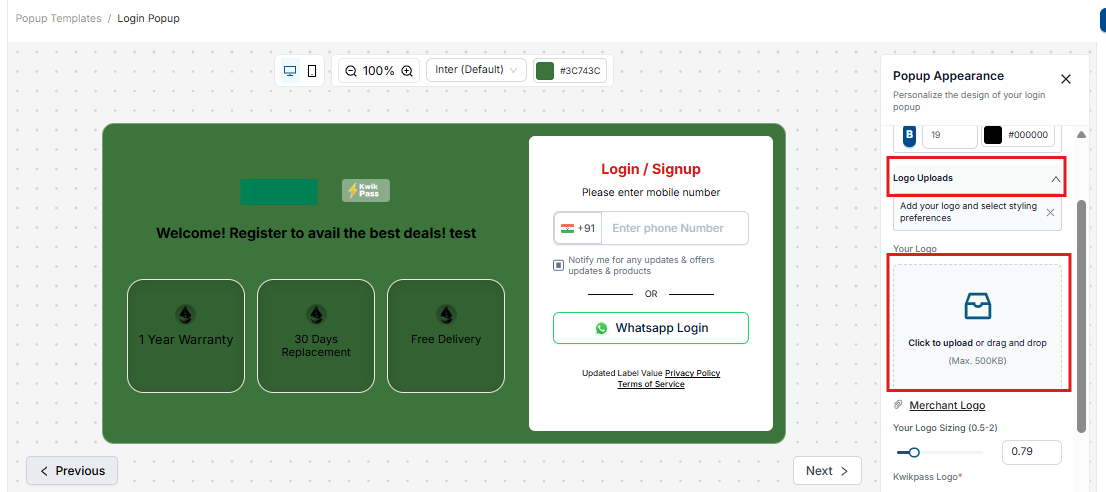
How else can I personalize the popup?
- Choose the background color of popup to align with your brand, change text, deactivate promotional tiles AND don’t forget to view the configurations in mobile view to optimize for your traffic.
- Choose the background color of popup to align with your brand, change text, deactivate promotional tiles AND don’t forget to view the configurations in mobile view to optimize for your traffic.
2️⃣ Data & Analytics
What can I do with the data captured through KwikPass?
- Firstly, this data is available on your Shopify under customers.
- Secondly, you can use this data for email automations, on different analytics/email marketing and SMS marketing tools to reach out to customers.
- We pass the marketing consent to your customer account.
Custom Tags: How do I configure them?
- Configure custom tag via configuration. Go to Coupon screen, and add upto 5 tags.
- Now, whenever the user is clicks on order history from the profile menu, the tag is passed to Shopify.
- After login on the store, go to customers on your Shopify store. Now select the customer number you logged with. Within the customer details you’ll find the custom tag on right corner.
3️⃣ Installation & Uninstallation
How do I uninstall KwikPass from my store?
- In case of manual integration, when you uninstall Kwikpass, you have to remove the scripts which you had added to your theme’s code.
- Delete the “kwikpass.liquid” file from snippet folder.
- From “theme.liquid” find and remove “{% render 'kwikpass' %}” and save changes
- In case of theme app extension, the KwikPass code is automatically removed when you uninstall KwikPass via Shopify uninstallation.
- In case of manual integration, when you uninstall Kwikpass, you have to remove the scripts which you had added to your theme’s code.
What happens when I change the theme?
In case of manual integration, remove the code from your existing theme, and add it to your new theme.
In case of theme app extension:
- Go to the new theme, you will notice the app block is already updated. So you don’t need migration.
- In case you get stuck anywhere, email us at kwikpass@gokwik.co
4️⃣ Account & Login Verification
How do I verify account creation on Shopify?
Click on the profile icon
- In case of a new user, fill the popup and then click again on the profile icon, you will see the drop down
- In case of SSO, you will see the drop down directly
- click on Order history
- Now, go to your store’s customer section and notice, the account is created
Why do I see the order history dropdown?
- You see this only in case of theme app extension
5️⃣ KwikPass Icon & UI Behavior
- Do I see a KwikPass power icon on my profile button in case of manual integration?
- No, you don’t. This is because a manual integration may be done on complex themes. Please note: in case of manual integration, the functionality will stay the same irrespective.
- If you really want it, you can upgrade to premium and reach out on kwikpass@gokwik.co to enable it!
- Why did my icon change?
- The icon gets a thunderbolt icon additionally on enabling theme app extension.
6️⃣ What is the difference between all plan?
| Plan | Basic | Premium | Custom |
|---|---|---|---|
| Pricing | Free | $20/month | Contact Sales |
| Login Credits | 5,000 phone-based logins/month | 20,000 phone-based logins/month | ♾️ Unlimited phone-based logins |
| Subscriber Boost | Boost subscribers via SSO | Boost subscribers via SSO | Boost subscribers via SSO |
| Features | Login Only | Login + Marketing Popups with behavior triggers + UI flexibility | Login + Marketing Popups with behavior triggers + UI flexibility |
| Marketing Popups | Spin the Wheel + 1 Popup | 4+ Marketing Popups | 4+ Marketing Popups |
| Support | Chatbot / Email Support | ⚡ Chatbot/ Priority Email Support | Dedicated WhatsApp Group Support |
| A/B Testing | Not Available | A/B Testing of Marketing Popup | A/B Testing of Marketing Popup |
6️⃣ FAQs and others
Q: How does KwikPass identify anonymous users?
A: We use advanced fingerprinting combined with phone-first OTP authentication to recognize visitors instantly—even without traditional logins.
Q: Can KwikPass integrate with my e-commerce platform?
A: Yes, KwikPass is designed to work seamlessly with Shopify and custom e-commerce solutions.
Q: What are smart marketing pop-ups?
A: They are interactive, personalized pop-ups that appear as soon as visitors land on your site, offering discounts and capturing key customer data.
Q: How does the integration with Kwik Engage benefit my business?
A: It enables targeted retargeting campaigns across multiple channels (WhatsApp, SMS, Email), leading to higher conversions and repeat sales.
Q: Is customer data secure with KwikPass?
A: Absolutely. We adhere to industry-best security practices to ensure that your customer data remains fully protected.We are PCI DSS compliant.
Q: Does KwikPass create dummy emails to login users to Shopify?
A: No, absolutely not. We have customer email associated with users in our network system. If we don’t find any, then we ask the user for their email upon login to Shopify.Q: Can I run A/B test with the marketing popups?
A: Absolutely. From March, 2025 this feature is available to merchants.Q: How all can I use smart marketing popups?
A: We should use marketing popups to various ends.
Support & Troubleshooting
- Having trouble?
- Reach out at kwikpass@gokwik.co
- Reach out at kwikpass@gokwik.co
7️⃣ Key features of KwikPass
✅ 1. Single-Click Login
Make login frictionless with one-click access—no passwords, no hassle. A seamless experience that keeps your customers moving.
✅ 2. Login with Just a Phone Number
Allow users to log in with their phone number—works for both KwikPass and Shopify.
- We only ask for an email if it’s missing from your Shopify or KwikPass database.
- Less friction, higher login success!
✅ 3. Trigger-Based Marketing Popups
Engage visitors at the right moment with smart marketing popups.
- Triggers include page scroll, specific pages viewed, time spent, and more!
- Perfect for lead capture and conversion boosts.
✅4. A/B Test Your KwikPass Popups
Optimize performance with built-in A/B testing:
- Test designs, pages, and when/where your popup shows.
- Measure impact by tracking orders placed and other key metrics.
- Easily find what works best for your store!
✅5. Engage & Convert with Smart Pop-Ups
Trigger behavior-based marketing pop-ups designed to capture leads and guide customers toward purchase.
✅ Offer personalized discounts
✅ Collect emails effortlessly
✅ Reduce drop-offs and improve conversion rates
✅6. Data-Driven Insights & Compliance
Gain visibility into visitor behavior and optimize your funnel with powerful insights:
✅ Track drop-off points and engagement
✅ Optimize conversion strategies in real time
✅ Stay compliant with GDPR and data privacy regulations through customizable consent management
✅7. Retarget & Recover Lost Sales
Turn anonymous visitors into customers with Kwik Engage:
✅ Retarget via WhatsApp, SMS, and Email
✅ Recover abandoned carts
✅ Drive repeat purchases and maximize revenue
Was this article helpful?
That’s Great!
Thank you for your feedback
Sorry! We couldn't be helpful
Thank you for your feedback
Feedback sent
We appreciate your effort and will try to fix the article