Instagram access tokens automatically expire every 30 days. Once the token expires, all connected Instagram flows and automations will stop working until the token is refreshed.
To ensure your Instagram-related automations run smoothly, please follow the steps below.
⚠️ What Happens When the Token Expires?
Automated flows stop functioning
Instagram comments, replies, and message triggers may not work
Even if the panel shows "Connected," the backend token may already be expired
✅ How to Refresh Your Instagram/Facebook Access Token
Follow these steps to restore uninterrupted automation:
Log in to your Kwikengage panel (https://app.kwikengage.ai)
Click on Getting Started in the top-left corner.
Select Instagram or Facebook (based on which platform you received the API expiry email for).
Click Disconnect.
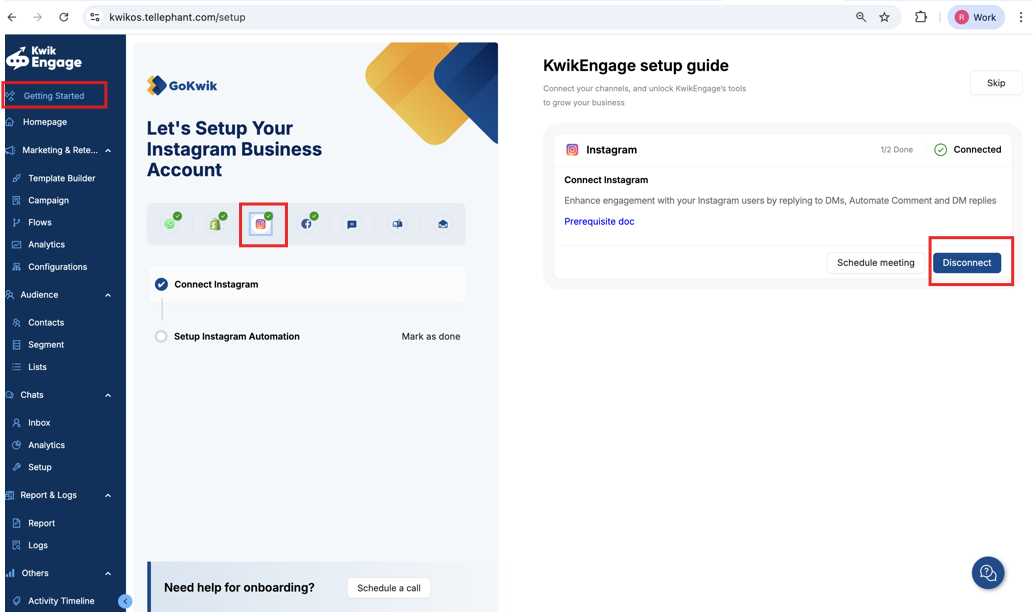
Refresh the page.
Click Connect and follow the steps again to re-authorize access.
This will generate a fresh access token and your flows will start working again.
Was this article helpful?
That’s Great!
Thank you for your feedback
Sorry! We couldn't be helpful
Thank you for your feedback
Feedback sent
We appreciate your effort and will try to fix the article
