You can follow these steps to migrate the KwikPass code to a different Shopify theme:
Steps to Migrate KwikPass Code to Another Theme
- Login to the KwikPass Dashboard
Go to: https://dashboard.gokwik.co/
- Open the KwikPass Section
From the left-hand menu, click on the Thunder icon (⚡).
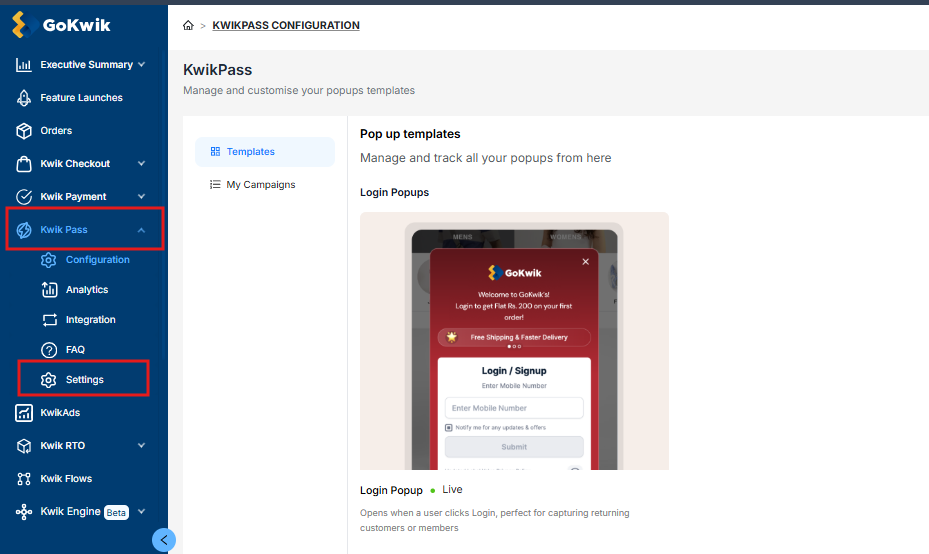
- Navigate to Theme Migration
Go to Settings.
Select Theme Migration.
- Select the Theme
Choose the desired Shopify theme from the dropdown menu.
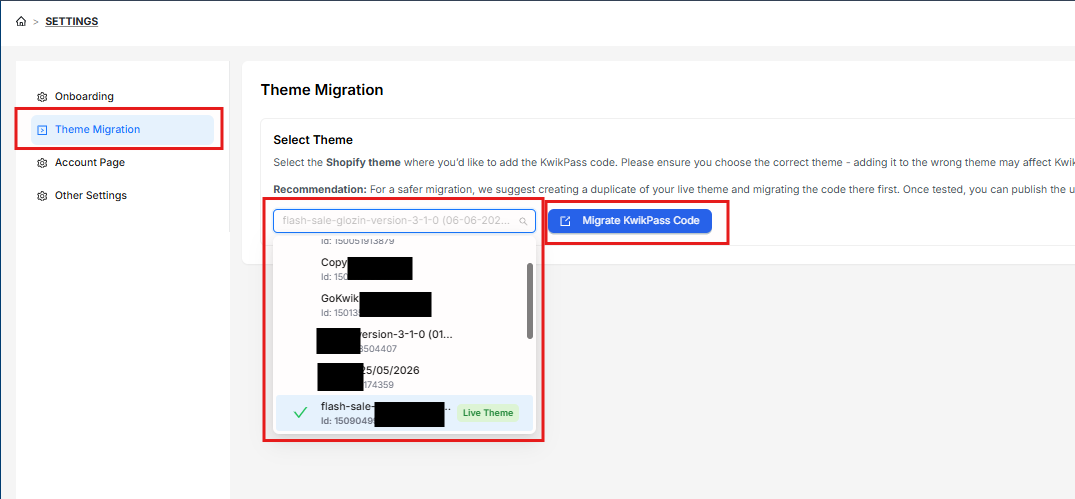
- Migrate the KwikPass Code
Click on Migrate KwikPass Code.
The system will automatically copy the required KwikPass integration code to the selected theme.
Important Note
After the migration is completed, we recommend reviewing the selected theme and testing the checkout/login flow to ensure KwikPass is functioning correctly on the new theme.
Was this article helpful?
That’s Great!
Thank you for your feedback
Sorry! We couldn't be helpful
Thank you for your feedback
Feedback sent
We appreciate your effort and will try to fix the article
